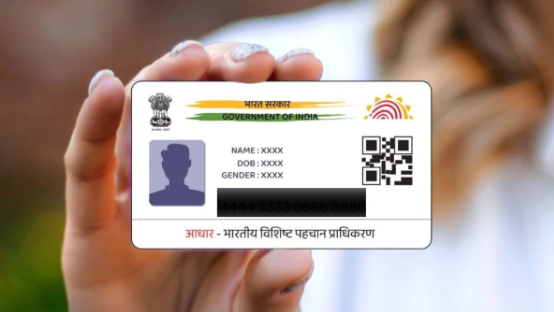
In today’s digital age, securing personal information is paramount. The Aadhaar card, a unique identification number assigned to Indian residents, is pivotal in accessing various services. However, you may sometimes require a masked Aadhaar card for privacy reasons or to protect your sensitive data. Furthermore, there might be instances where you need to verify the signature in your Aadhaar card to confirm its authenticity. This article will guide you through both processes, ensuring you are well-equipped to manage your Aadhaar card effectively.
What is a Masked Aadhaar Card?
A masked Aadhaar card is essentially a version of your Aadhaar card where the first eight digits of your 12-digit Aadhaar number are hidden. This allows you to share your Aadhaar details without revealing your complete number, thus enhancing your privacy while still proving your identity.
Why Use a Masked Aadhaar Card?
– Privacy Protection: Masked Aadhaar ensures that only the necessary details are shared.
– Fraud Prevention: It minimizes the chances of identity theft.
– Secure Transactions: Use it in applications where full disclosure of your Aadhaar number isn’t required.
How to Get Masked Aadhaar Card
Obtaining a masked Aadhaar card is simple and can be accomplished online. If you want to know how to get masked aadhaar card, you can follow a few straightforward steps through the UIDAI website. Here’s a step-by-step guide:
Step 1: Visit the UIDAI Website
Go to the UIDAI website, the official portal for Aadhaar services.
Step 2: Log In to Your Account
– Click on the “Download Aadhaar” option.
– Enter your Aadhaar number or Enrollment ID along with the other necessary details.
– You will receive an OTP on your registered mobile number. Enter the OTP to proceed.
Step 3: Request for Masked Aadhaar
When you reach the download page, you will have the option to select “Masked Aadhaar” before downloading. Ensure you choose this option.
Step 4: Download the Document
– After confirming your request, download the PDF.
– The masked Aadhaar will be in a password-protected format.
– Use the password format: the first four letters of your name (as per Aadhaar) in uppercase followed by your birth year.
Step 5: Access Your Masked Aadhaar Card
Once you enter the correct password, you can view and print your masked Aadhaar card.
How to Verify Signature in Aadhaar Card
To verify the authenticity of your Aadhaar card’s signature, it is important to understand how to verify signature in aadhar card using the available digital verification facilities. You can follow these methods to check the document’s authenticity:
Step 1: Locate the Signature
– The signature is usually available on the front of the Aadhaar card, right below your demographic details.
Step 2: Compare with the Online Signature Verification
To verify the authenticity of your Aadhaar card’s signature, follow these methods:
– Method 1: UIDAI’s e-Signature Verification
1. Visit the UIDAI Website: Access the UIDAI website once more.
2. Navigate to the E-signature Section: Look for features related to signature or e-KYC services.
3. Enter Aadhaar Details: Fill in your Aadhaar number and other requested information.
4. Submit: By submitting, you can check the validity of your Aadhaar number which includes signature verification details.
– Method 2: Using the DigiLocker Facility
1. Create a DigiLocker Account: If you don’t have one, sign up for an account at DigiL
ocker.
2. Link Your Aadhaar: Use the “Link Aadhaar” feature to connect your Aadhaar.
3. Access the Document: Once linked, access your Aadhaar card through DigiLocker, where the signature can be verified against the original electronically stored documents.
Frequently Asked Questions
Q1: Is it safe to use a masked Aadhaar card?
Yes, a masked Aadhaar card is designed to protect your sensitive information while still proving your identity.
Q2: Can I get a masked Aadhaar card if I have lost my original Aadhaar?
Yes, you can download a masked Aadhaar card as long as you have your Aadhaar number or Enrollment ID.
Q3: How can I update my Aadhaar signature?
You need to visit an Aadhaar Enrollment Center with your request and valid ID proof to update your signature.
Q4: What if I forget my masked Aadhaar password?
Forgetting the password means you cannot access your masked Aadhaar card. Try various combinations of your name and birth year or request a new download.
Conclusion
Understanding how to obtain a masked Aadhaar card and verifying the signature on Aadhaar is crucial for anyone using this identification method in India. Both processes are straightforward and can be completed online, empowering you to manage your sensitive information effectively and securely.
If you’re looking to download a masked Aadhaar card or verify its signature, follow the steps outlined above, and always ensure your data is protected. For further assistance or queries, feel free to visit the UIDAI Official Website.
Call to Action
Protect your identity today by obtaining a masked Aadhaar card and keeping your personal information secure. For more updates on Aadhaar services, stay connected with us!
By following this guide, you can navigate through the process of getting a masked Aadhaar card and verifying a signature with ease, ensuring your privacy and security in today’s digital landscape.







+ There are no comments
Add yours